PulseDev for React.Click it, fix the JSX.
Click any element in your running React app and say what’s wrong. Your agent finds the component, proposes a diff, and Vite hot-reloads the page once you approve it.
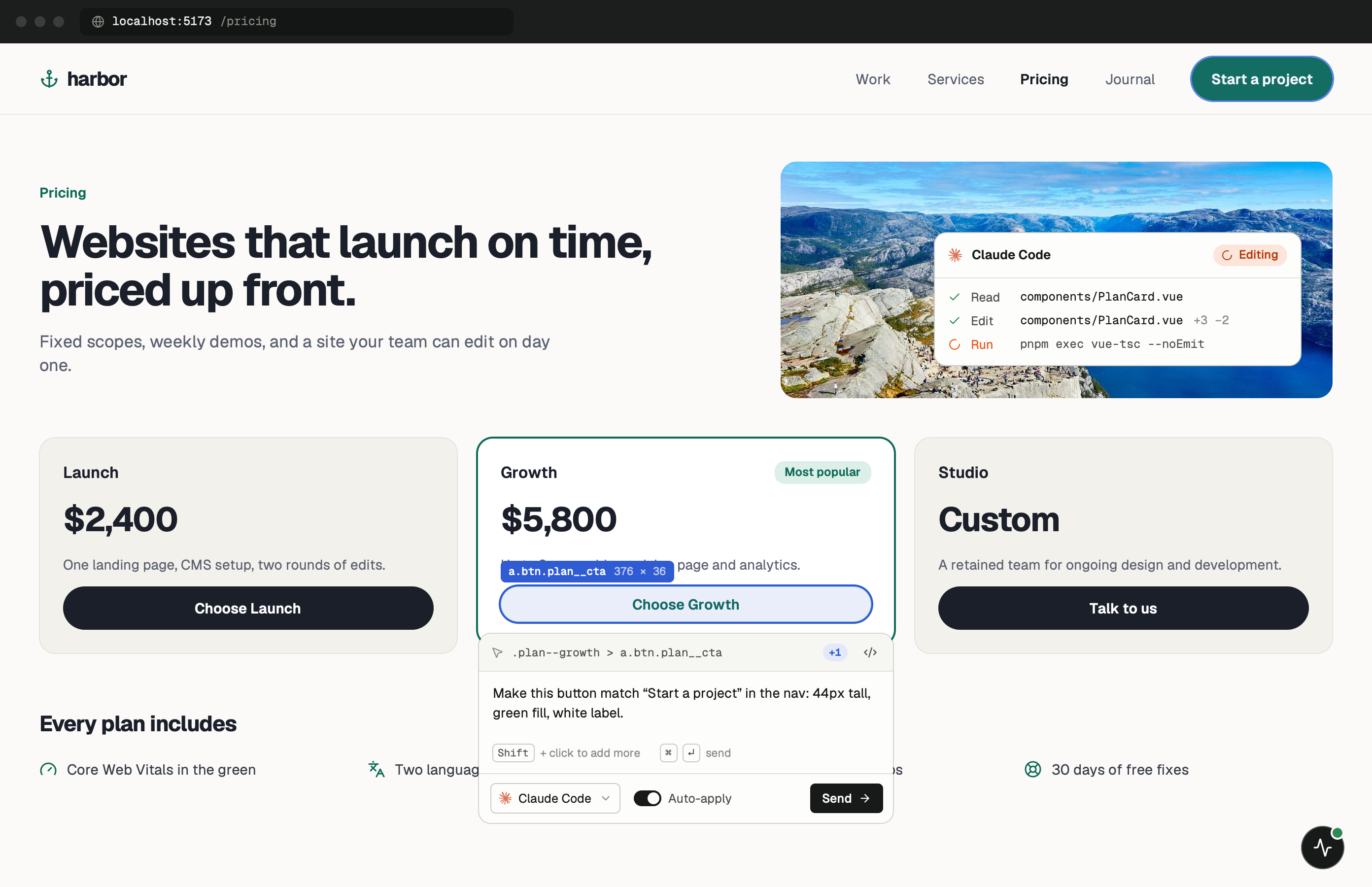
What PulseDev sees in a React app.
React renders everything into one root element, so by the time you click, the widget is looking at plain DOM: the element, its classes, its text and the styles the browser applied. It doesn’t read the React component tree yet. That’s the job of the planned @pulsedev/react package.
Plain DOM is usually enough. Class names, visible text and the page URL are all things an agent can search your project for, and that search leads to the component. Where it gets harder is generic markup, like a div with three utility classes that appears in twenty components. A short hint in your note (“the card in the pricing grid”) narrows it down.
One minute of setup.
None of it ships.
Set up project in the app detects Vite + React from package.json and writes the plain tag into index.html, keeping a .pulsedev.bak copy. It also adds the @pulsedev/vite plugin to vite.config, which isn’t on npm yet. If you’d rather keep production HTML untouched, use the config snippet below. Copy the real token and port from the app; 3899 is only the example. About the Vite plugin.
- Add
Inject the tag in dev only.
A small inline plugin with apply: 'serve' adds the tag while vite is serving and never during vite build, so index.html stays clean. Not on Vite? Put the plain tag in public/index.html and take it out before you deploy.
vite.config.ts import { defineConfig } from 'vite' import react from '@vitejs/plugin-react' export default defineConfig({ plugins: [ react(), { name: 'pulsedev-widget', apply: 'serve', transformIndexHtml: () => [{ tag: 'script', attrs: { src: 'http://localhost:3899/widget.js', 'data-token': 'YOUR_TOKEN' }, injectTo: 'body', }], }, ], }) - Run
Start Vite.
Open the URL Vite prints, usually localhost:5173. Once the widget connects, press the PulseDev button and click the element you want changed.
terminal $npm run dev
Notes for
React projects.
Things worth knowing before your first fix in a React codebase.
Review first, then Fast Refresh
By default PulseDev asks the agent to propose changes rather than edit files. Approve applies the proposal, then Vite’s React Fast Refresh updates the component.
Portals and modals
Anything rendered through createPortal sits outside your root in the DOM. You can still click it, but the selector won’t sit under #root, so mention which component opens the modal.
Utility-class markup
With Tailwind, many elements share the same class string. Click the most specific element you can, or Cmd-click to select its parent, and let the visible text do the rest.
Load the widget once
If Set up project already put a tag in index.html, don’t add the config snippet as well. Two copies register the widget twice and the second one fails in the console.
React questions.
- Does PulseDev know which React component I clicked?
- Not yet. Today it sends the DOM element, its selector, styles, a screenshot and the page URL, and the agent searches your source from there. Component names and source locations per click are what @pulsedev/react is for.
- Does it work with React Router or TanStack Router?
- Yes. Client-side navigation doesn’t reload the page, so the widget stays loaded as you move between routes, and each note carries the URL you were on when you sent it.
- What about Create React App or webpack?
- Use the plain script tag in public/index.html. There’s no dev-only hook as tidy as Vite’s apply: 'serve', so remove the tag before you build.
- Does it handle TypeScript and Tailwind?
- Yes. The agent edits .tsx files and Tailwind class strings the same way you would, following whatever styling the component already uses.
Your React app is running.Go point at the bug.
Windows coming soon. Free to start.