PulseDev for Vue.Click it, fix the .vue.
Click any element in your running Vue app and say what’s wrong. Your agent opens the .vue file, proposes a diff, and Vite hot-reloads the component after you approve it.
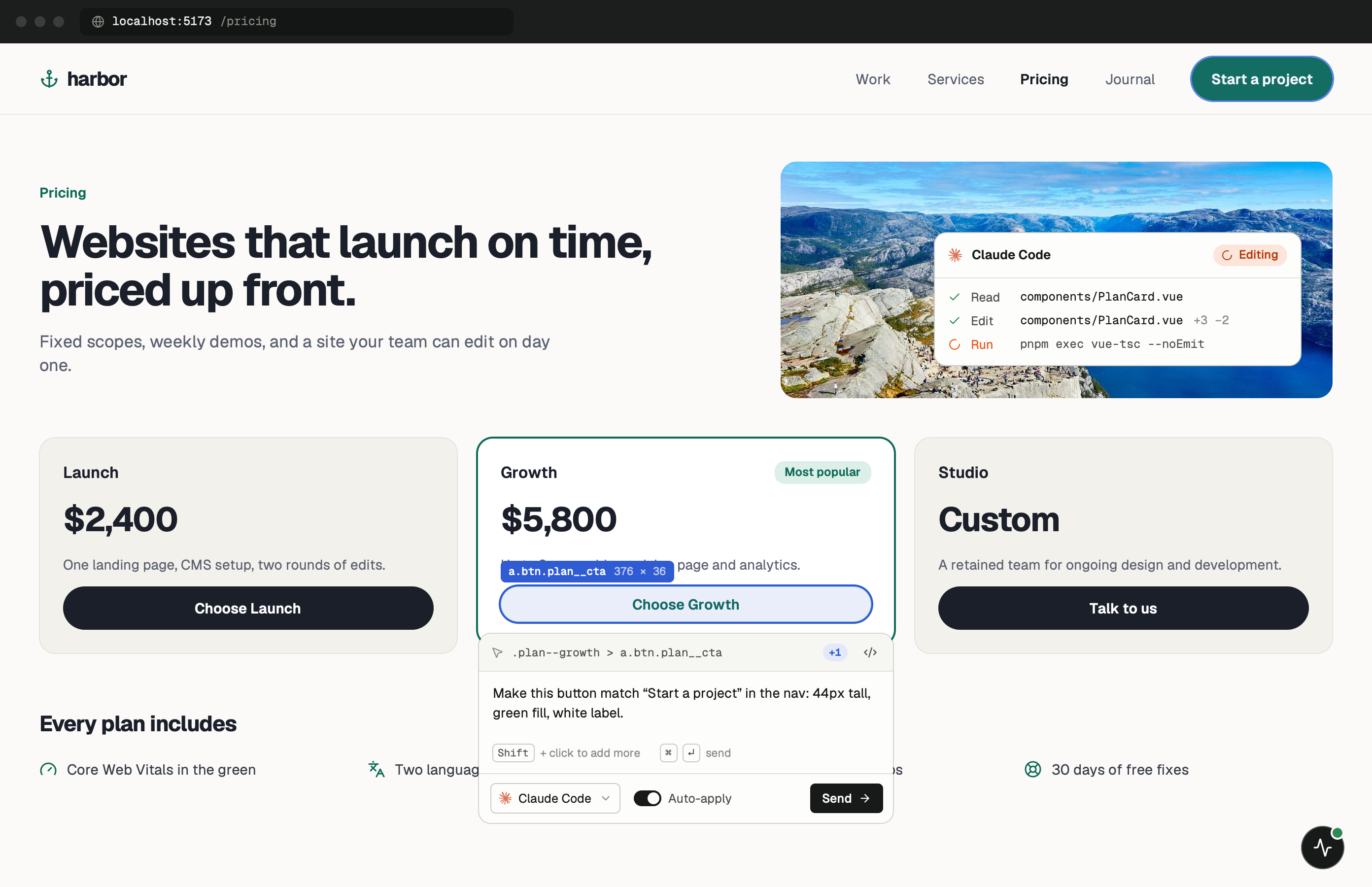
Single-file components, one click away.
A Vue component keeps its template, script and styles in one .vue file, which suits this workflow. When you point at a misaligned button, the markup and the scoped CSS that styles it are usually in the same file, so the agent can make the whole fix in one place.
Scoped styles add data-v-* attributes to the DOM. Those hashes don’t name the component, but the widget also sends the element’s classes, text and the CSS rules that matched it, and those are what the agent searches for.
One minute of setup.
None of it ships.
Set up project detects Vite + Vue and writes a plain tag into index.html, with a .pulsedev.bak backup. It also adds @pulsedev/vite to vite.config, which isn’t on npm yet. If you’d rather do it yourself, the entry-file snippet below keeps the widget out of production. About the Vite plugin.
- Add
Load it from your entry file.
import.meta.env.DEV is true under vite and false in vite build, so the block is dropped from production bundles. No change to index.html needed.
src/main.ts import { createApp } from 'vue' import App from './App.vue' createApp(App).mount('#app') if (import.meta.env.DEV) { const s = document.createElement('script') s.src = 'http://localhost:3899/widget.js' s.dataset.token = 'YOUR_TOKEN' document.body.appendChild(s) } - Run
Start Vite.
Open the dev URL. Vue mounts first, then the widget script loads and the PulseDev button appears. Press it, then click the element.
terminal $npm run dev
Notes for
Vue projects.
Details that matter when the agent works on .vue files.
Scoped and global styles
Matched CSS rules go along with each click, so the agent can see whether a style comes from the component’s <style scoped> block or from a global stylesheet.
Component libraries
With Vuetify, PrimeVue or Quasar, the element you click is often library markup. Describe the result you want (“make this button full width”) and the agent can change props or wrapper styles in your own component.
Approve, then HMR
In review mode, PulseDev asks for a proposed diff. Approve applies it, then Vite’s Vue HMR updates the component.
One widget at a time
Use either the tag Set up project added to index.html or the main.ts snippet. Loading both registers the widget twice and the second copy fails.
Vue questions.
- Options API or Composition API?
- Either. PulseDev reads the rendered page, and the agent edits the file in whatever style it’s already written in, <script setup> included.
- Does it work with Vue Router?
- Yes. The widget stays on the page across route changes, and each note carries the current URL so the agent can find the route component.
- Is the setup the same as Nuxt?
- No. Nuxt has no index.html or main.ts to edit, so it uses app.head in nuxt.config.ts. The Nuxt guide has the snippet.
- Is Pinia state sent with a click?
- Not today. The agent can still read and edit your stores as source files. Sending store state with each click is part of the planned @pulsedev/vuejs package.
Your Vue app is running.Go point at the bug.
Windows coming soon. Free to start.